Using Lakeleto
Everything in Lakeleto 0.4.1, in the order you'll need it: install, the browser UI, every CLI command, the sources it reads, and how to run it for others. The examples use orders.parquet, the 5,000-row sample in examples/sample-data/. The outputs shown are what 0.4.0 prints.
Install
| Platform | Get it | Then |
|---|---|---|
| Windows | lakeleto-0.4.1-x64.msi from the release | Double-click. Installs for your user (no admin). Start Menu → Lakeleto. Puts lakeleto on your PATH; open a new terminal. |
| macOS | Lakeleto-0.4.1.dmg (Intel + Apple Silicon) | Drag to Applications. It lives in the menu bar. Menu bar → Install command line tool… for the CLI. |
| macOS / Linux | brew install lucheeseng827/lakeleto/lakeleto | CLI only. |
| Any, with Rust | cargo binstall lakeleto | Fetches the prebuilt binary for your platform. |
| Docker | mancube/lakeleto (amd64, arm64) | See serve. |
| Archive | lakeleto-<target>.tar.gz / .zip | Unzip, run. One static executable. Linux x86_64 and arm64 (static), macOS Intel and Apple Silicon, Windows x86_64. |
| Windows on ARM64 | No prebuilt binary yet | Build from source with the command below. |
Every release asset has a cosign signature (.sig, .pem), a .sha256 and SLSA provenance. Windows SmartScreen and macOS Gatekeeper will warn on first launch until code-signing certificates exist. See Troubleshooting.
Building from source? The release feature set is:
cargo install lakeleto --features serve,sql,iceberg,object-store,catalog,sqlite,postgres,mysql,delta,mcp,remote,parquet-out,compressionQuick start
In the browser
- Installer: open Lakeleto from the Start Menu or Applications. Your browser opens at the viewer.
Terminal:lakeleto serve --root ~/data, then open http://127.0.0.1:8080. Orlakeleto open orders.parquetto start the server and open that file. - Click a file in Files on the left. It opens in a tab on the Grid.
- Click a column header to sort. Type in the box under a header to filter. Switch to Schema, Profile or SQL at the top.
In the terminal
$ lakeleto schema orders.parquet          # what's in it
$ lakeleto head orders.parquet -n 20      # first rows
$ lakeleto profile --fast orders.parquet  # nulls, min, max from the footer
$ lakeleto query "SELECT city, count(*) n FROM t GROUP BY city" --file orders.parquet
Three ideas
- A source is anything you can point at. A file, a folder of Parquet parts, an Iceberg or Delta table,
s3://…,catalog://…, or a database URI. Lakeleto reads it where it sits. There's no import step. - In SQL, the source is the table
t. The SQL tab andlakeleto query --fileregister it ast. Name more tables with--table name=path. A database's SQL uses its own table names. - Everything is read-only. SQL accepts
SELECT,WITHandEXPLAIN; database connections are opened read-only. Export writes a new file.
The UI: layout
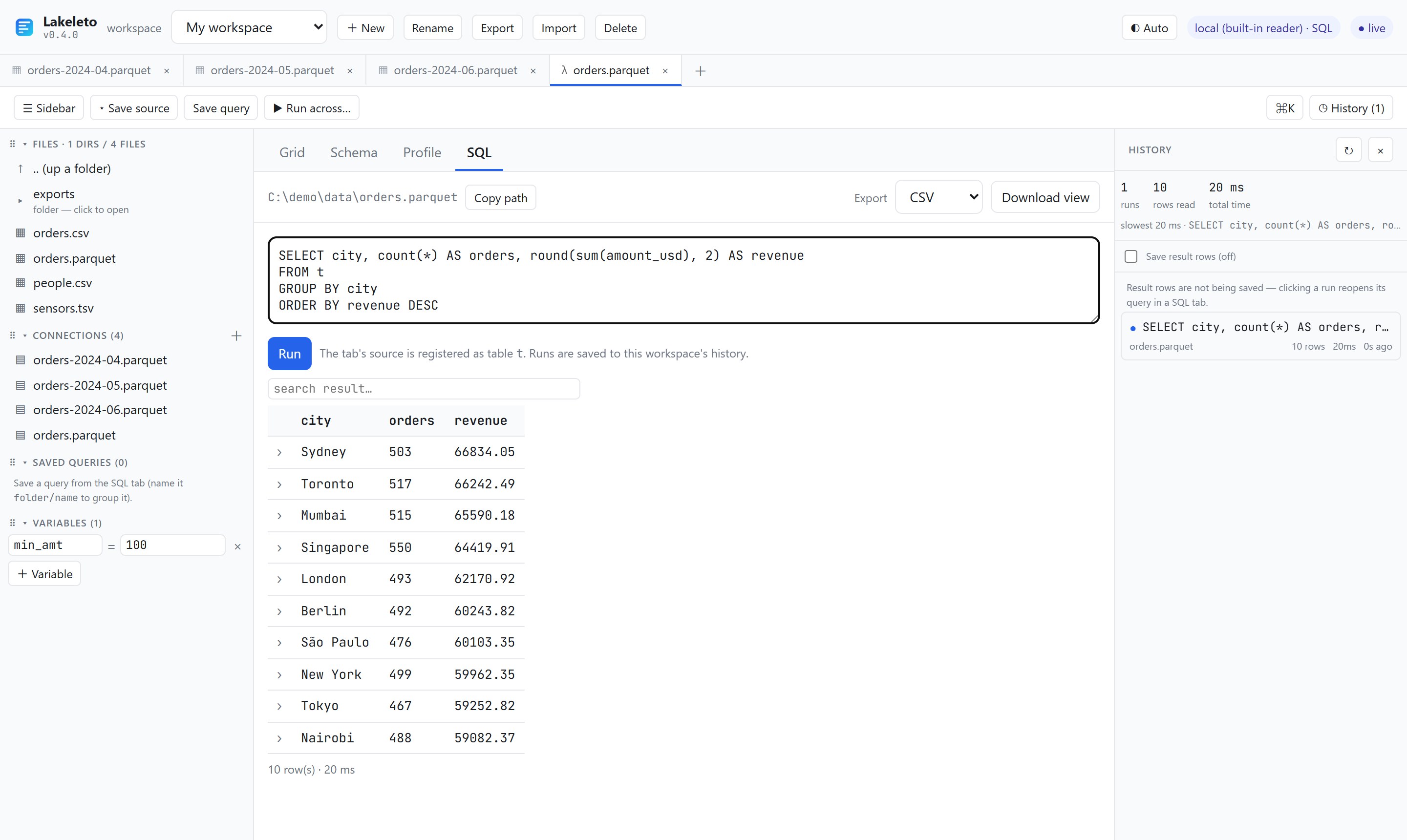
| Region | What's there |
|---|---|
| Workspace bar | The workspace picker, + New, Rename, Export, Import, Delete. On the right: the theme (◐ Auto → ☀ Light → ☾ Dark), the engine in use, and live when connected. |
| Tabs | One per open source. ▦ is a data tab; λ a tab on its SQL view; ▤ a cached result; ⇄ a compare. + opens a new tab. |
| Toolbar | ☰ Sidebar, ⭑ Save source, Save query, ▶ Run across…, ⌘K (palette), ◷ History. |
| Sidebar | Files (the folder you serve), Connections (saved sources), Saved queries, Variables. Drag the ⠿ handles to reorder sections; drag tabs to reorder them. |
| Tab views | Grid, Schema, Profile, SQL. Above them: the source path, Copy path, the export format and Download view. |
| History | Every SQL run in this workspace: rows, time, when. Totals at the top. |
Opening a source
- Files: click a file to open it in a new tab; click a folder to go into it; ↑ .. goes up. A folder of Parquet files, an Iceberg table and a Delta table each open as one table.
- + (new tab): type or paste a path,
s3://URI,catalog://reference or database URI.{{variables}}work here. - ⌘K: type part of a file or connection name, then Enter.
- From the terminal:
lakeleto open path/to/file.
Click ⭑ Save source to pin the tab's source under Connections. Saved connections survive a restart and are what Run across targets.
Grid
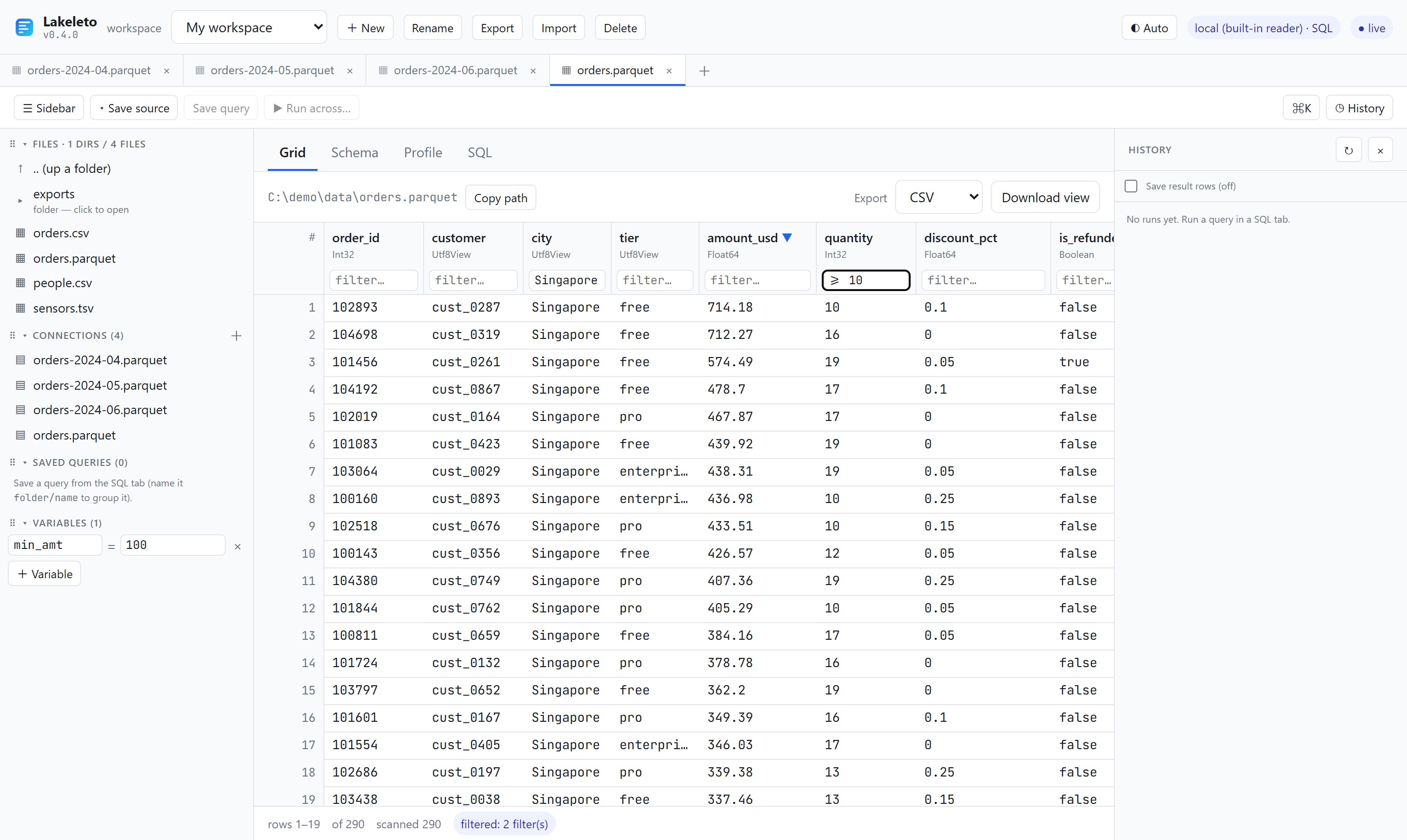
amount_usd (▼), filtered by city and quantity. The footer says 290 matched of 5,000.- Sort: click a header: ascending, again for descending, a third time to clear.
- Filter: type in the box under a header. Filters on several columns combine with AND.
- Copy a cell: click it (or focus it and press Enter).
- Scroll: all the way. The grid fetches a window of rows as you go. A CSV or JSON file's total isn't known until its end is read, so the footer shows
≥ Nand grows. - Footer: rows shown, total, rows scanned, and how many filters are active.
| Type in a filter box | Matches |
|---|---|
Singapore or ~Singapore | contains the text |
!~test | doesn't contain it |
^cust_00, $_9 | starts with / ends with |
>= 100, > 100, < 5, <= 5 | comparisons |
= pro, != free | equal / not equal |
in: pro, enterprise | any of a comma-separated list |
null, !null | empty / not empty |
With SQL in the build (the release has it), sort and filter run in the engine over the whole table and are exact. Without it, they run over the first 200,000 rows and the footer says the view is partial.
JSON sources get a Records button: where in the document the rows are (/data · auto when detected). Sources with struct columns get Flatten structs, which turns user.geo.lat into its own column.
Row detail
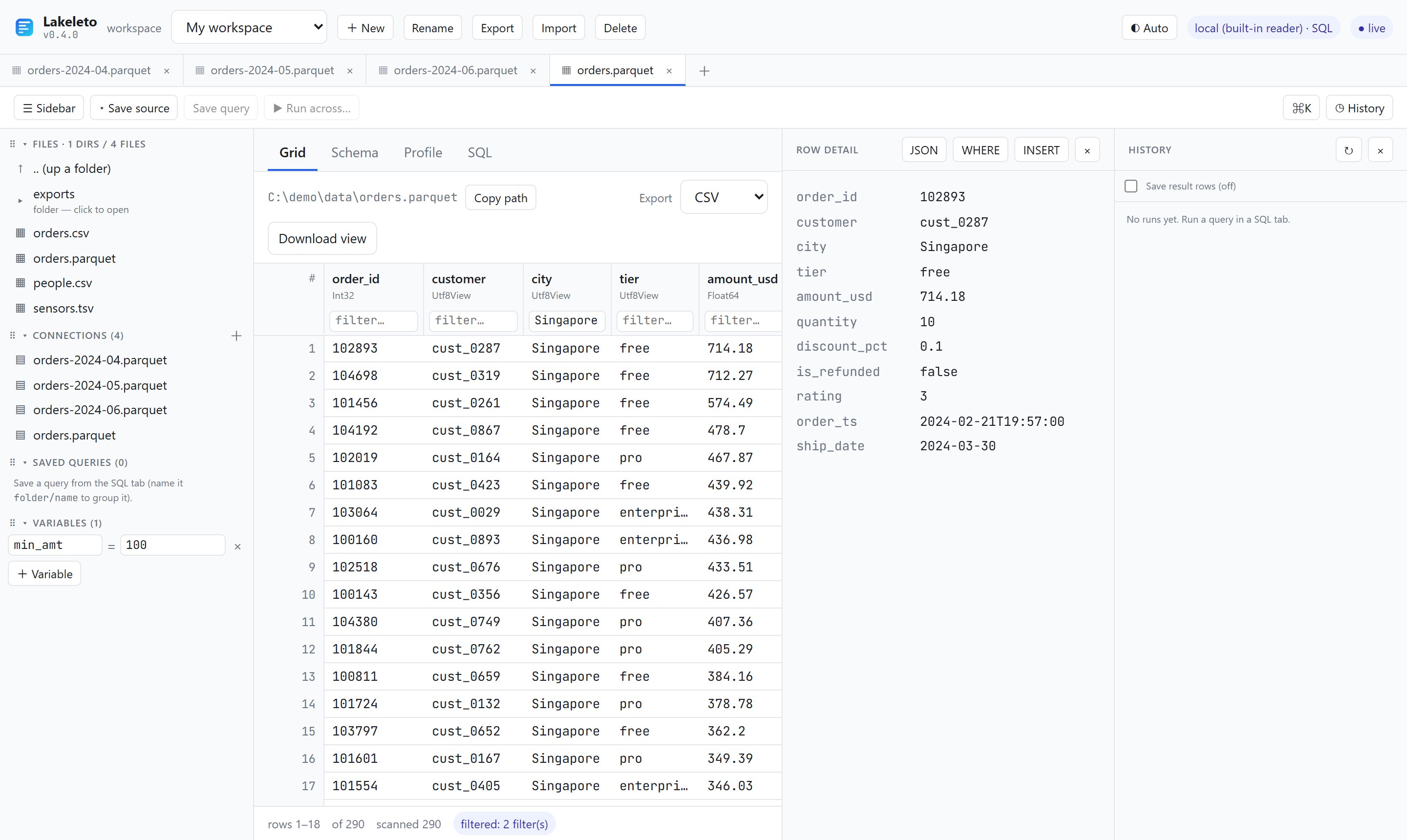
- JSON copies the row as a JSON object.
- WHERE copies a clause matching this row, quoted for the source's SQL dialect. Paste it to find the row again.
- INSERT copies an
INSERT INTO … VALUES …for seeding a test fixture.
Schema and Profile
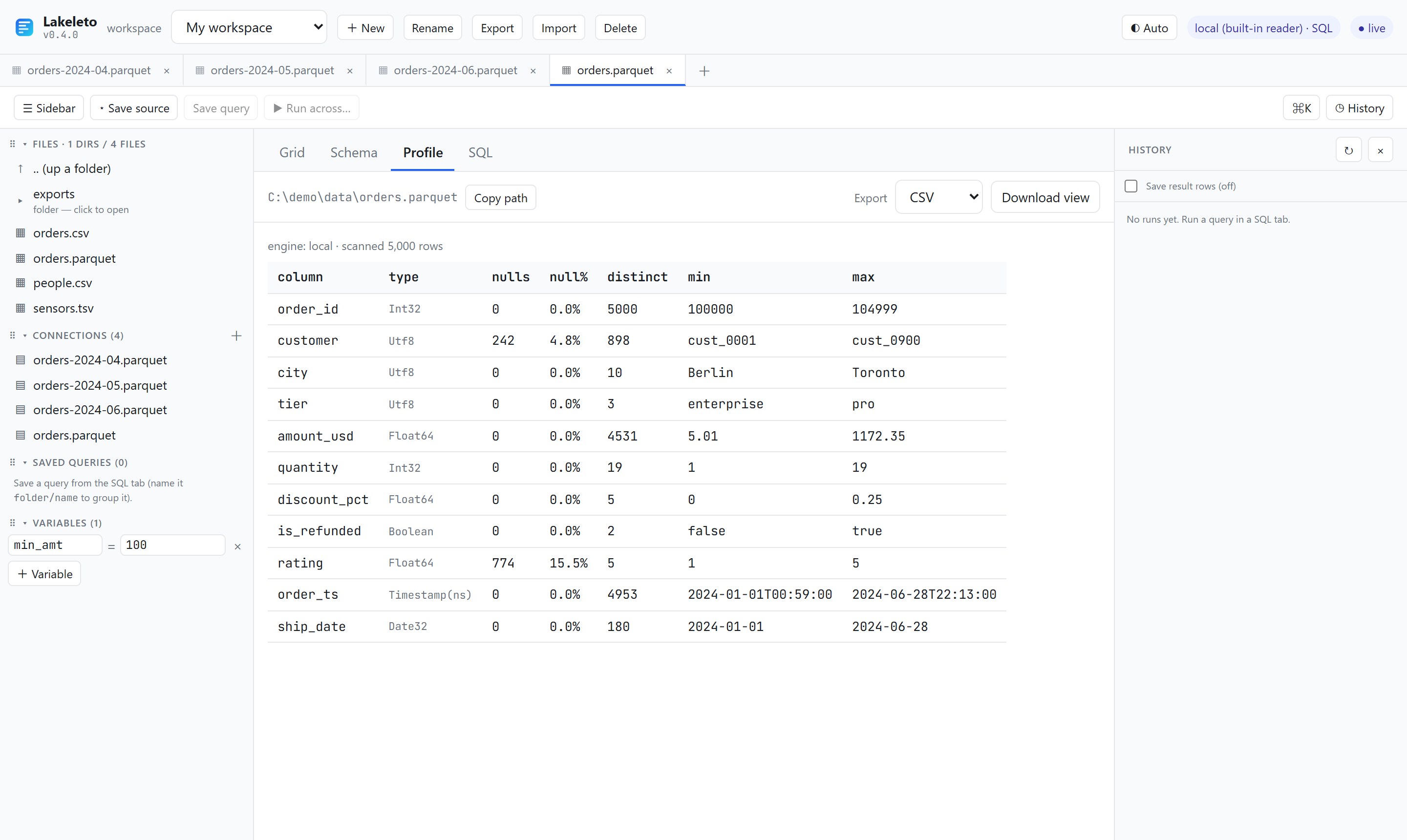
Schema lists each column's name, Arrow type and nullability, plus the format, engine and row count. For Parquet and Arrow files the count comes from the footer.
Profile scans up to 10,000 rows by default (--default-scan on the server changes it). It respects the grid's filters, so filter first to profile a slice.
SQL
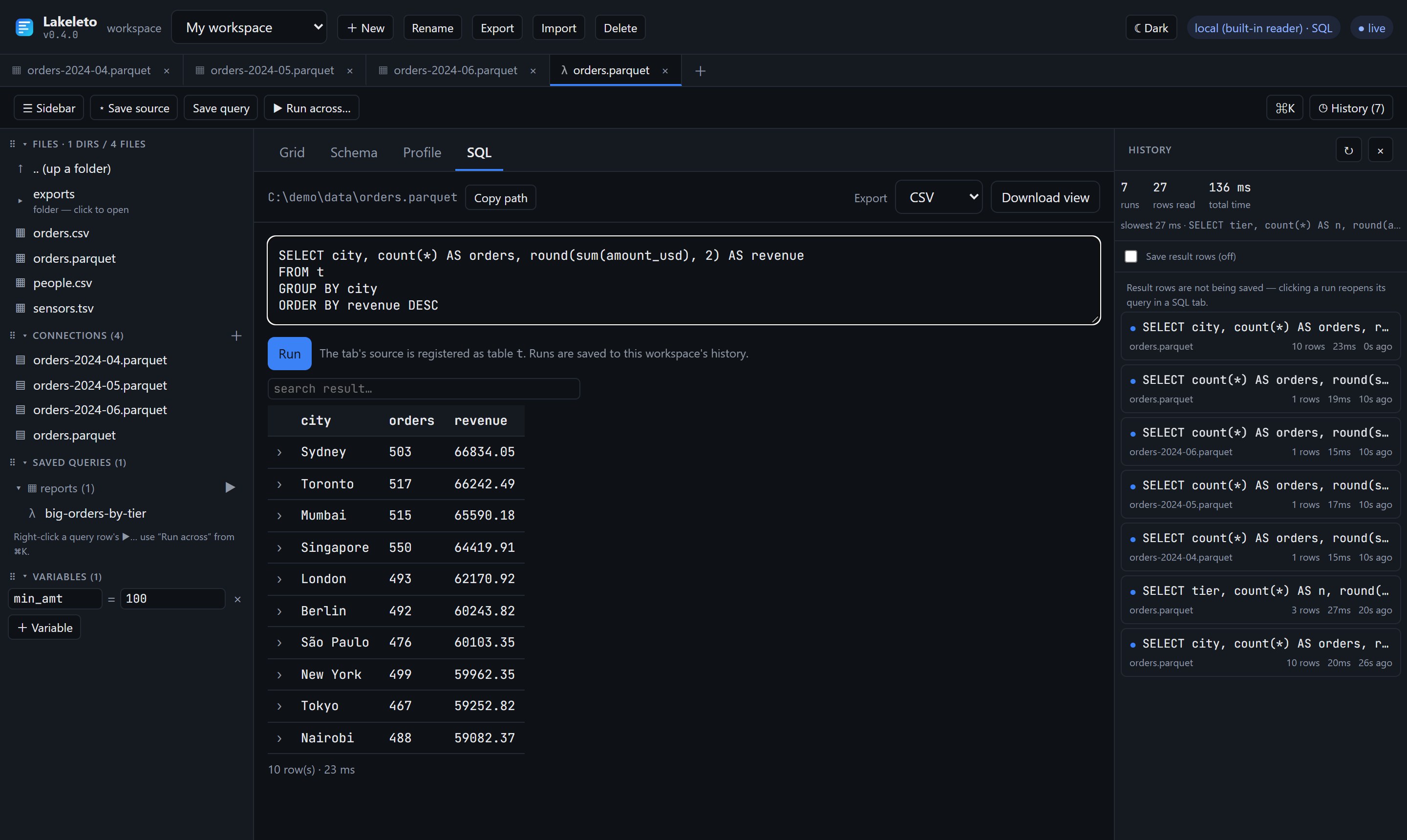
t. Ctrl/⌘ + Enter or Run.- The tab's source is the table
t. Partition columns from Hive folders are real columns. - SQL is DataFusion's dialect:
date_trunc, window functions, CTEs,regexp_likeand so on. On a database connection it's the database's own SQL. - search result… narrows the result rows on screen. The › on a row opens its detail.
- The result count and time show under the table. The run goes to History.
History and compare
- ◷ History toggles the panel. Each run shows its SQL, source, rows, time and age. Click one to reopen the query in a SQL tab.
- Tick Save result rows to cache results (as Parquet, in the workspace). A cached run reopens instantly without re-reading the source.
- Compare: on two cached runs, click compare on each. A ⇄ tab shows them side by side with a diff summary.
Saved queries
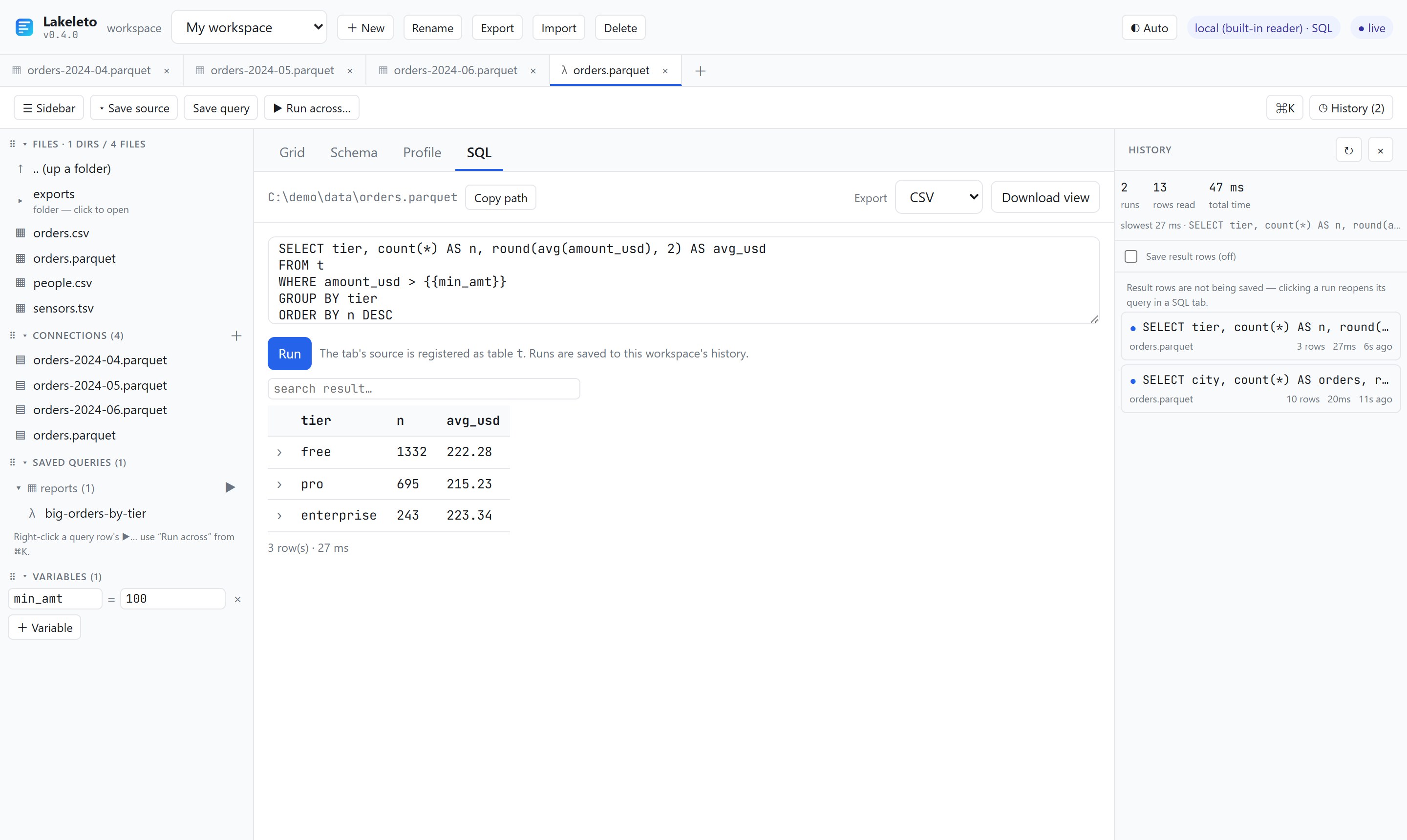
reports/big-orders-by-tier, saved from the SQL tab, using {{min_amt}}.- On a SQL tab, click Save query and name it. A name with a slash, like
reports/daily, files it in a folder. - Click a saved query to open it. The ▶ on a folder runs every query in it, each with its own SQL and source: a report pack.
Variables
Sidebar → + Variable → a key and a value. Use {{key}} in SQL or in a path. It's substituted as text right before the query runs.
SELECT * FROM t WHERE city = '{{city}}'        -- quote strings yourself
SELECT * FROM t WHERE amount_usd > {{min_amt}}  -- numbers bare
C:\exports\orders-{{day}}.parquet               -- in the path box too
postgres://me:{{PGPASS}}@db:5432/shop            -- secrets stay out of saved URIs
An unset {{x}} shows a warning chip until you define it. It's a text substitution, not a bound parameter, so don't paste untrusted text into a value.
Run across
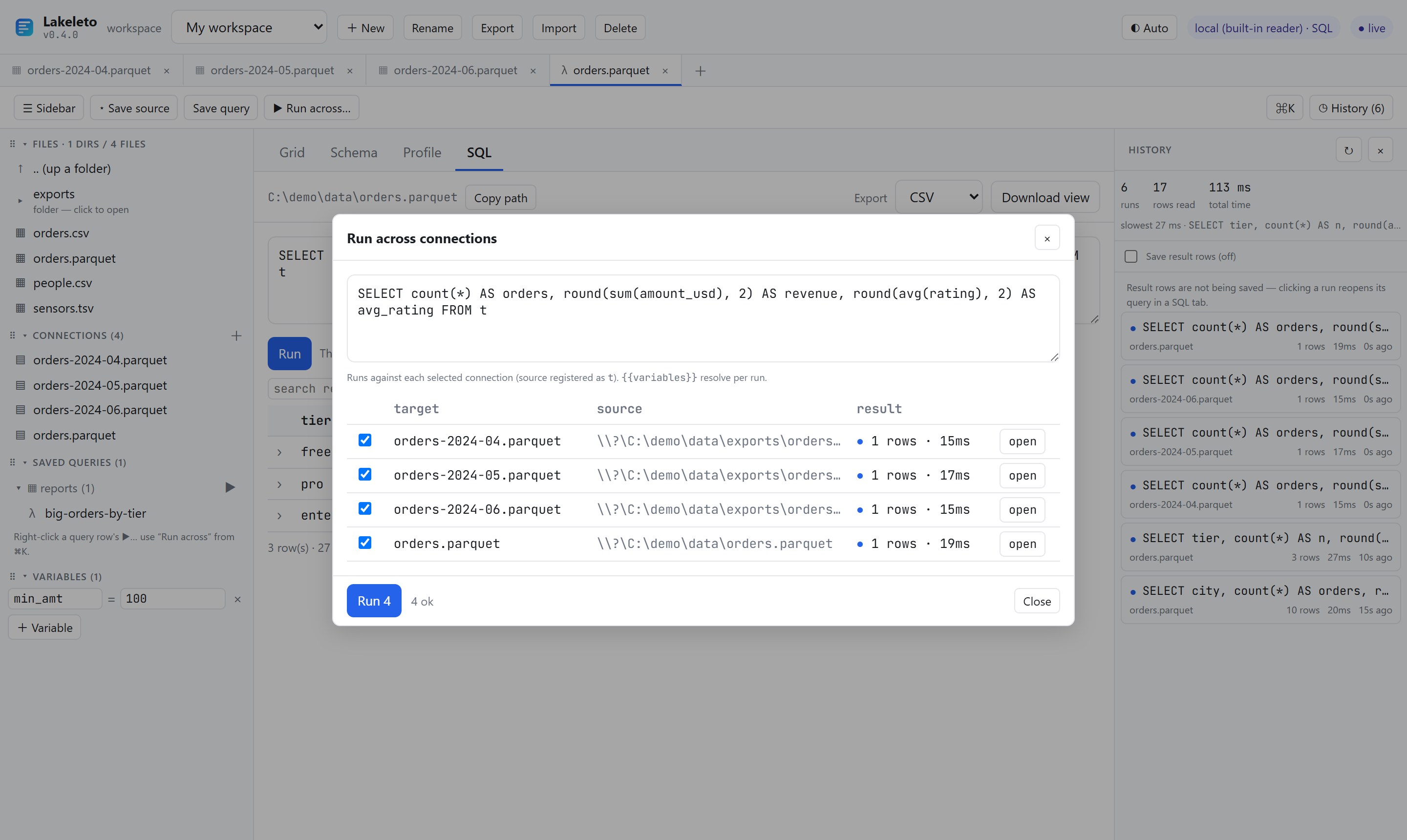
- Save each source you want with ⭑ Save source.
- On a SQL tab, write a query against
t. - ▶ Run across… → tick the targets → Run. Each result has an open button. A source whose columns don't fit fails on its own row only.
Export
Pick CSV, JSON or Parquet next to Download view (the API's /v1/export also does TSV and NDJSON). You get the view as it is, with its sort, filters and columns, over every matching row, not only those on screen. The cap is 1,000,000 rows and 512 MiB per file.
Databases in the UI
Sidebar Connections → + → SQLite, Postgres or MySQL → paste the URI, optionally a table → Add. A whole-database connection lists its tables; click one to open it. The ✎ on a connection edits it.
sqlite:///C:/data/app.db
sqlite:///home/me/app.db?table=orders
postgres://user:{{PGPASS}}@host:5432/shop
mysql://user:{{MYSQLPASS}}@host:3306/shop
The open-source build allows two database connections open at once.
Workspaces
A workspace holds your tabs, connections, saved queries, variables and history. Switch with the picker; + New, Rename, Delete do what they say. Export downloads a bundle and Import loads one as a new workspace, so you can hand a set of queries to a colleague.
They're stored in ~/.lakeleto/workspaces/<id>/ (workspace.json, history.jsonl, results/*.parquet). Set LAKELETO_HOME to move them.
Keyboard
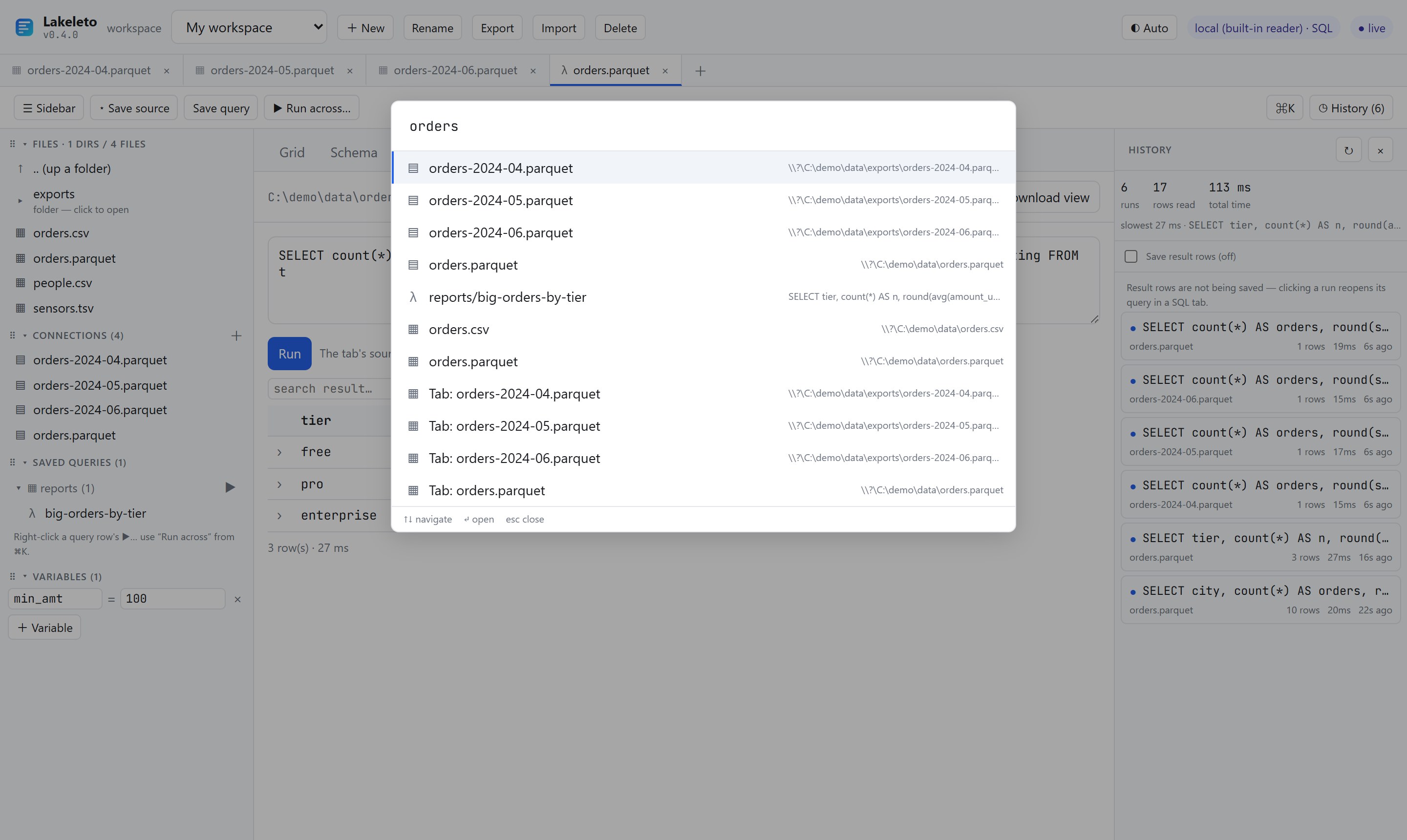
| Keys | Does |
|---|---|
| Ctrl/⌘ K | Command palette (↑ ↓, Enter, Esc) |
| Ctrl/⌘ Enter | Run the SQL tab's query |
| Ctrl/⌘ B | Show / hide the sidebar |
| Alt T | New tab |
| Alt W | Close tab |
| Alt R | Reopen the last closed tab |
| Alt ← / → | Previous / next tab |
| Esc | Close the palette, row detail or a dialog |
| Enter / Space | On a header: sort. On a cell: copy. On a row number: detail. |
The Alt and Ctrl+B shortcuts don't fire while you're typing in a box.
The CLI
lakeleto [OPTIONS] <COMMAND>
| Command | Does |
|---|---|
schema | Columns, types, nullability, row count |
head | The first N rows |
profile | Null %, distinct, min/max per column |
info | Format, engine, size, rows, columns |
query | Read-only SQL over one or more tables |
open | Start the UI and open a file in the browser |
serve | Serve the UI and the HTTP API |
catalog ls | Browse Iceberg REST catalogs |
engines | What this binary can read |
mcp | Serve tables to an AI agent over MCP |
Anywhere a <PATH> goes, you can give a local file or folder, s3://, gs://, az://, catalog:// or a database URI. lakeleto <command> --help prints the full help.
Global flags
| Flag | Default | Does |
|---|---|---|
-o, --output <FMT> | table | table, json, ndjson, csv, tsv; for rows also parquet, arrow, arrows. See Output formats. |
--out <FILE> | stdout | Write to a file. It appears only if the command succeeds. With no -o, the extension picks the format. |
--format <NAME> | inferred | Read as parquet, csv, tsv, json, arrow, iceberg, delta or database. |
--json-path <POINTER> | detected | Where a JSON document's rows are: /response/items or data. "" reads the whole document as one row. |
--flatten[=N] | off | Spread struct columns into a.b.c columns; =1 for one level. |
--max-decompressed <BYTES> | 4GiB | Stop a compressed read past this size (512M, 8GiB). Env LAKELETO_MAX_DECOMPRESSED. |
--engine <E> | auto | auto, local, sql, remote. |
--remote-url <URL> | — | Read through another Lakeleto server instead of this machine. Env LAKELETO_REMOTE_URL. |
--remote-token <TOK> | — | Bearer token for it. Env LAKELETO_REMOTE_TOKEN. |
schema
lakeleto schema <PATH>
Columns, types and nullability. For Parquet and Arrow the row count is read from the footer, without reading rows.
$ lakeleto schema orders.parquetsource : orders.parquet
format : parquet
engine : local
rows : 5000
columns: 11
column type null?
------------ ------------- -----
order_id Int32 yes
customer Utf8 yes
city Utf8 yes
tier Utf8 yes
amount_usd Float64 yes
quantity Int32 yes
discount_pct Float64 yes
is_refunded Boolean yes
rating Float64 yes
order_ts Timestamp(ns) yes
ship_date Date32 yeshead
lakeleto head <PATH> [-n, --rows <N>]
The first N rows (default 10). Reads only as far as it needs.
$ lakeleto head orders.parquet -n 5| order_id | customer | city | tier | amount_usd | quantity | discount_pct | is_refunded | rating | order_ts | ship_date |
|----------|-----------|----------|------------|------------|----------|--------------|-------------|--------|---------------------|------------|
| 100000 | cust_0332 | Berlin | pro | 23.29 | 13 | 0.05 | false | 3.0 | 2024-06-13T04:40:00 | 2024-01-22 |
| 100001 | cust_0155 | Nairobi | enterprise | 66.53 | 1 | 0.0 | false | 4.0 | 2024-03-10T08:12:00 | 2024-02-03 |
| 100002 | cust_0405 | Toronto | free | 164.86 | 12 | 0.1 | false | 1.0 | 2024-06-21T00:31:00 | 2024-06-12 |
| 100003 | cust_0667 | New York | pro | 59.14 | 16 | 0.25 | false | 4.0 | 2024-02-24T12:57:00 | 2024-01-11 |
| 100004 | cust_0050 | New York | free | 53.34 | 16 | 0.05 | false | 4.0 | 2024-04-02T18:46:00 | 2024-04-05 |
5 row(s)profile
lakeleto profile <PATH> [--scan <N>] [--fast]
| Flag | Default | Does |
|---|---|---|
--scan <N> | 10000 | Rows to scan for nulls, distinct values, min, max and samples. |
--fast | off | Parquet only: nulls, min and max from the footer for the whole file, no scan. No distinct counts. |
$ lakeleto profile orders.csvsource : orders.csv
engine : local
rows : unknown (scanned 5000)
| column | type | nulls | null% | distinct | min | max |
|--------------|--------------|-------|-------|----------|---------------------|---------------------|
| order_id | Int64 | 0 | 0.0% | 5000 | 100000 | 104999 |
| customer | Utf8 | 242 | 4.8% | 898 | cust_0001 | cust_0900 |
| city | Utf8 | 0 | 0.0% | 10 | Berlin | Toronto |
| tier | Utf8 | 0 | 0.0% | 3 | enterprise | pro |
| amount_usd | Float64 | 0 | 0.0% | 4531 | 5.01 | 1172.35 |
| quantity | Int64 | 0 | 0.0% | 19 | 1 | 19 |
| discount_pct | Float64 | 0 | 0.0% | 5 | 0 | 0.25 |
| is_refunded | Boolean | 0 | 0.0% | 2 | false | true |
| rating | Float64 | 774 | 15.5% | 5 | 1 | 5 |
| order_ts | Timestamp(s) | 0 | 0.0% | 4953 | 2024-01-01T00:59:00 | 2024-06-28T22:13:00 |
| ship_date | Date32 | 0 | 0.0% | 180 | 2024-01-01 | 2024-06-28 |info
lakeleto info <PATH>
$ lakeleto info orders.parquetpath : orders.parquet
format : parquet
engine : local
size : 115.1 KiB
rows : 5000
columns: 11For a catalog:// table, info also says whose credentials read it: vended, catalog or ambient.
query
lakeleto query <SQL> [--file <PATH>] [--table <NAME=PATH>]…
| Flag | Does |
|---|---|
--file <PATH> | Register a source as the table t. |
--table <NAME=PATH> | Register a source under a name. Repeat for joins. |
One SELECT, WITH or EXPLAIN statement. Anything that writes is refused. With a database URI, the SQL runs in the database and names its tables.
$ lakeleto query "SELECT city, count(*) AS orders, round(sum(amount_usd), 2) AS revenue
    FROM t GROUP BY city ORDER BY revenue DESC LIMIT 5" --file orders.parquet
| city | orders | revenue |
|-----------|--------|----------|
| Sydney | 503 | 66834.05 |
| Toronto | 517 | 66242.49 |
| Mumbai | 515 | 65590.18 |
| Singapore | 550 | 64419.91 |
| London | 493 | 62170.92 |
5 row(s)# join two sources
$ lakeleto query "SELECT o.city, avg(p.score) FROM o JOIN p ON o.city = p.city GROUP BY 1" \
--table o=orders.parquet --table p=people.csv
# a whole SQLite database: its own table names
$ lakeleto query "SELECT city, count(*) FROM orders GROUP BY city" --file 'sqlite:///home/me/app.db'
# a catalog table
$ lakeleto query "SELECT count(*) FROM t" --table t=catalog://prod/sales/ordersOutput formats
-o | For |
|---|---|
table | Reading in a terminal (the default) |
json, ndjson | jq, scripts |
csv, tsv | Spreadsheets. Nested values become JSON text in the cell. |
parquet | DuckDB, Polars, pandas, Spark, with types kept |
arrow | Arrow IPC file / Feather v2: pandas.read_feather, polars.read_ipc |
arrows | Arrow IPC stream, to pipe: polars.read_ipc_stream(sys.stdin.buffer) |
$ lakeleto head orders.parquet -n 5 -o csvorder_id,customer,city,tier,amount_usd,quantity,discount_pct,is_refunded,rating,order_ts,ship_date
100000,cust_0332,Berlin,pro,23.29,13,0.05,false,3.0,2024-06-13T04:40:00,2024-01-22
100001,cust_0155,Nairobi,enterprise,66.53,1,0.0,false,4.0,2024-03-10T08:12:00,2024-02-03
100002,cust_0405,Toronto,free,164.86,12,0.1,false,1.0,2024-06-21T00:31:00,2024-06-12
100003,cust_0667,New York,pro,59.14,16,0.25,false,4.0,2024-02-24T12:57:00,2024-01-11
100004,cust_0050,New York,free,53.34,16,0.05,false,4.0,2024-04-02T18:46:00,2024-04-05# a filtered slice as a Parquet file, then into DuckDB
$ lakeleto query "SELECT * FROM t WHERE amount_usd > 100" --file orders.csv --out big.parquet
$ duckdb -c "SELECT city, sum(amount_usd) FROM 'big.parquet' GROUP BY city"
# an Arrow stream straight into Polars
$ lakeleto head orders.parquet -n 100000 -o arrows | python -c "import sys, polars as pl; print(pl.read_ipc_stream(sys.stdin.buffer).describe())"The binary formats are refused when stdout is a terminal: use --out, a redirect or a pipe.
open and serve
lakeleto open <PATH> [--addr …] [--root …] [--token …] [--default-scan …]
lakeleto serve [--addr …] [--root …] [--token …] [--default-scan …] [--workspace-remote …]
| Flag | Default | Does |
|---|---|---|
--addr <HOST:PORT> | 127.0.0.1:8080 | Where to listen. Env LAKELETO_ADDR. |
--root <DIR> | any path | Refuse every read outside this folder, and all bucket, catalog and database URIs. |
--token <TOK> | none (open) | Require Authorization: Bearer <TOK> on /v1/*. Env LAKELETO_TOKEN. |
--default-scan <N> | 10000 | Rows the Profile view scans. |
--workspace-remote <URL> | local disk | serve only: keep workspaces on another server. Env LAKELETO_WORKSPACE_REMOTE, token LAKELETO_WORKSPACE_REMOTE_TOKEN. |
$ lakeleto open orders.parquet                     # browser opens on the file
$ lakeleto serve --root ~/data                     # browse a folder at :8080
$ lakeleto serve --addr 127.0.0.1:8090              # another port
$ docker run --rm -p 127.0.0.1:8080:8080 -v "$PWD:/data:ro" \
    mancube/lakeleto serve --addr 0.0.0.0:8080 --root /data
Stop it with Ctrl+C. The installed desktop app picks a free port itself and lives in the tray / menu bar, where Quit is.
catalog ls
lakeleto catalog ls [REFERENCE]
$ lakeleto catalog ls                         # configured catalogs (no network call)
$ lakeleto catalog ls catalog://prod/         # prod's namespaces
$ lakeleto catalog ls catalog://prod/sales/   # namespaces and tables in sales
It prints names, types and URIs, never a credential. Setup is in REST catalogs.
engines
What this binary was built with. The release binary has everything. A source build lists what's missing and the feature that adds it. With --remote-url it reports the server's engines.
Lakeleto engine backends:

  ✓ local (built-in reader)          reads: parquet, csv, tsv, json, arrow, iceberg, delta
  ✓ sql (DataFusion)                 reads: parquet, csv, tsv, json, arrow, iceberg, delta + read-only SQL
  ✓ iceberg (reader)                 reads: iceberg tables (current-snapshot Parquet)
  ✓ delta (reader)                   reads: delta lake tables (JSON transaction log)
  ✓ object-store (s3/gs/az)          reads: remote parquet, csv, tsv, json and arrow via your own creds
  ✓ catalog (Iceberg REST)           reads: catalog:// tables, with the credentials the catalog vends
  ✓ sqlite (read-only)               reads: sqlite files + connection URIs
  …
mcp
lakeleto mcp [--root <DIR>] [--max-rows N] [--max-bytes N] [--timeout SECS] [--default-scan N]
Lets an AI agent read your tables over the Model Context Protocol, on stdin and stdout. The agent's client starts it; you don't run it yourself.
# Claude Code, confined to ./data
$ claude mcp add lakeleto -- lakeleto mcp --root "$PWD/data"
// Claude Desktop, Cursor (.cursor/mcp.json), or a project .mcp.json
{
"mcpServers": {
"lakeleto": { "command": "lakeleto", "args": ["mcp", "--root", "/Users/me/data"] }
}
}| Tool | Does |
|---|---|
list | A folder's subfolders and tables; also a bucket prefix, a database or a catalog namespace |
describe | Columns, types, row count, and Parquet footer stats, without reading rows |
preview | Rows from any offset, optionally some columns |
profile | Nulls, distinct, min, max, samples |
query | One read-only SQL statement |
catalog_ls | Catalogs, namespaces, tables |
| Flag | Default | Does |
|---|---|---|
--root | any path | Only this folder; bucket, database and catalog references are refused |
--max-rows | 1000 | Most rows per call |
--max-bytes | 32768 | Most bytes of JSON per call; a cut result says truncated |
--timeout | 30 | Seconds per call |
The agent sees what the tools return, and so does the service that runs it. Point --root at data you're fine with both reading.
Sources: files and folders
| Source | Recognised by |
|---|---|
| Parquet | .parquet, .pq, or its magic bytes. Snappy, gzip, LZ4, zstd, Brotli. |
| CSV / TSV | .csv, .tsv. Types are inferred. |
| JSON | .json, .ndjson, .jsonl, .geojson. NDJSON, a top-level array, or one records member like {"data": [...]}, detected. |
| Arrow | .arrow, .feather, .ipc files and .arrows streams. |
| Compressed text | .csv.gz, .ndjson.zst, .tsv.bz2, .json.xz, read as they decompress |
| A folder of Parquet | Read as one table, columns unioned. key=value folders (Hive partitions) become columns. |
warehouse/orders/date=2026-07-17/part-0.parquet
warehouse/orders/date=2026-07-18/part-0.parquet

$ lakeleto query "SELECT date, count(*) FROM t GROUP BY date" --file warehouse/orders/
Iceberg and Delta
- Iceberg: a folder with a
metadata/child. Lakeleto reads the current snapshot, with positional and equality deletes applied. Locally or in a bucket. - Delta: a folder with
_delta_log/. Lakeleto replays the JSON log, so overwritten and deleted rows don't show. Checkpoints aren't read yet: if log cleanup removed early commits, the table may not open or may undercount.VACUUMis fine.
$ lakeleto open ./warehouse/db/orders
$ lakeleto open s3://my-bucket/warehouse/db/orders
S3, GCS and Azure
Credentials come from your environment, exactly as the cloud SDKs read them. Bytes go from the bucket to your machine. Parquet and Arrow are read with ranged requests, so only the footer and the parts a read needs are fetched.
$ export AWS_ACCESS_KEY_ID=… AWS_SECRET_ACCESS_KEY=… AWS_REGION=us-east-1
$ lakeleto schema s3://my-bucket/events/2026-07-18.parquet
$ export AWS_ENDPOINT=https://…         # MinIO, R2 and other S3-compatible stores

$ export GOOGLE_APPLICATION_CREDENTIALS=/path/to/key.json
$ lakeleto profile gs://my-bucket/events.parquet

$ export AZURE_STORAGE_ACCOUNT_NAME=… AZURE_STORAGE_ACCOUNT_KEY=…
$ lakeleto head az://my-container/events.parquet
In the UI, paste s3://my-bucket/warehouse/ into a new tab to browse the prefix. Schemes: s3/s3a, gs/gcs, az/azure/abfs/abfss/adl.
--root refuses bucket URIs. Run without it when you read remote data.
Iceberg REST catalogs
Name a table by catalog instead of by location: catalog://<catalog>/<namespace>/<table>. Tested against Apache Polaris and Lakekeeper; Nessie and Unity Catalog speak the same protocol.
# ~/.lakeleto/catalogs.toml
[catalog.prod]
uri = "https://polaris.example.com/api/catalog"
warehouse = "analytics"
oauth2-server-uri = "https://polaris.example.com/api/catalog/v1/oauth/tokens"

# the secret stays out of the file
$ export LAKELETO_CATALOG__PROD__CREDENTIAL='<client-id>:<client-secret>'
$ lakeleto open catalog://prod/sales/orders
Any key can also be set as LAKELETO_CATALOG__<NAME>__<KEY>. Credentials the catalog vends are kept in memory and refreshed before they expire. Glue and S3 Tables need request signing, which isn't supported yet.
Databases
$ lakeleto head   'sqlite:///home/me/app.db?table=orders'
$ lakeleto schema 'postgres://me@db:5432/shop?table=orders'
$ lakeleto query  "SELECT city, count(*) FROM orders GROUP BY 1" --file 'mysql://me@db:3306/shop'
Connections are read-only. Without ?table= a URI names the whole database: the UI lists its tables and query uses its table names. On Windows, SQLite is sqlite:///C:/data/app.db.
Sharing it safely
By default serve listens on 127.0.0.1 and the API is open, which is fine on your own machine. Before anyone else can reach it:
$ lakeleto serve --addr 0.0.0.0:8080 --root /data --token "$(openssl rand -hex 16)"--rootconfines reads to one folder.--tokenrequires a bearer token on every API call. Without it, a non-loopback bind warns and stays open.- Prefer an SSH tunnel or a TLS reverse proxy over binding
0.0.0.0directly.
HTTP API
serve answers the same /v1 API the UI uses (protocol 1.0, sent as X-Lakeleto-Protocol). Rows come back as JSON, or as an Arrow IPC stream with Accept: application/vnd.apache.arrow.stream.
| Call | Returns |
|---|---|
GET /v1/schema?path= | Columns, types, row count |
GET /v1/preview?path=&limit= | First rows |
GET /v1/rows?path=&offset=&limit=&sort=&desc=&filter=col:op:value | A grid window |
GET /v1/profile?path=&scan= | Column profile (scan=0: footer only) |
GET /v1/export?path=&fmt= | The view as a file |
POST /v1/query {"sql", "file"} | SQL result |
GET /v1/list?dir= | A folder, prefix, database or namespace |
GET /v1/engines | Version, protocol, engines, limits |
$ curl 'localhost:8080/v1/schema?path=orders.parquet'
$ curl -sX POST localhost:8080/v1/query -H 'content-type: application/json' \
    -d '{"sql":"SELECT count(*) FROM t","file":"orders.parquet"}'
Filter operators: eq ne lt le gt ge contains notcontains startswith endswith in isnull notnull. The full reference is docs/CONFIG.md in the source.
Environment variables
| Variable | Does |
|---|---|
LAKELETO_HOME | Where workspaces and catalogs.toml live (default ~/.lakeleto) |
LAKELETO_ADDR | --addr for serve / open |
LAKELETO_TOKEN | --token |
LAKELETO_MAX_DECOMPRESSED | --max-decompressed |
LAKELETO_REMOTE_URL, LAKELETO_REMOTE_TOKEN | Read through another Lakeleto server |
LAKELETO_WORKSPACE_REMOTE, …_TOKEN | Keep workspaces on another server |
LAKELETO_CATALOG__<NAME>__<KEY> | Catalog settings and secrets |
AWS_*, GOOGLE_APPLICATION_CREDENTIALS, AZURE_STORAGE_* | Bucket credentials, read as the cloud SDKs read them |
Troubleshooting
| You see | Do |
|---|---|
| Windows: "Windows protected your PC" | More info → Run anyway. Check the .sha256 or cosign signature if you want proof. |
| macOS: "cannot verify the developer" | Right-click the app → Open once, or xattr -d com.apple.quarantine ./lakeleto. |
Double-clicking lakeleto.exe flashes a window | It's the CLI. Use the installer's Start Menu entry, or run it from a terminal. |
| Port 8080 in use | lakeleto serve --addr 127.0.0.1:8090 |
forbidden: path is outside the server root | The file is outside --root, or it's a bucket or database URI and --root is set. |
"rebuild with --features …" | Your build lacks that reader. Use the release binary, or add the feature. |
| An MCP client shows no Lakeleto tools | Run its exact command in a terminal: it should sit waiting for input. Claude Desktop needs absolute paths. |
| Run across fails on one source | That source lacks a column the query uses. The others still ran. |
Something missing or wrong here? Open an issue.